
Sonic Gift Cards -Check Balance, Reload and Discount
Sonic gift cards are a simple and tasty way to enjoy food at Sonic restaurants. You can buy one for yourself, give it as a gift, or keep it as a quick payment option. Sonic Drive-In gift cards are easy to use, reload, and check, making them a convenient choice for Sonic Menu fans. Here we will give you a complete guide so you can easily understand everything about Sonic gift cards.
What Are Sonic Gift Cards?
Sonic gift cards are prepaid cards that can be used at any Sonic restaurant or in the Sonic App. They come in different forms, such as:
- Physical Sonic gift card – Plastic card available in-store or online.
- Sonic eGift card – A digital version sent by email.
- Custom Sonic restaurant gift cards – Available on selected websites.
You can even find $5 Sonic gift cards for small gifting or quick meals.
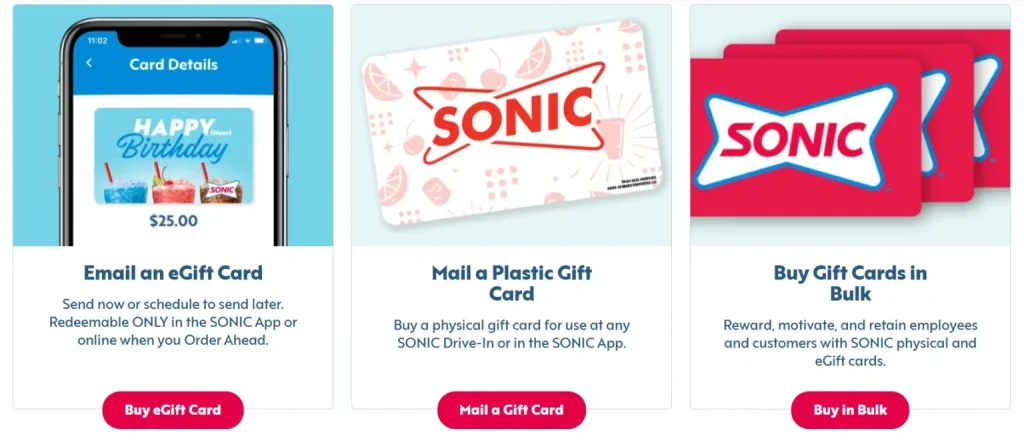
Sonic Physical Gift Card
- A physical gift card is a plastic card, just like a credit card.
- It can be used at any Sonic Drive-In location to buy food and drinks.
- Available amounts: $5, $10, $25, $50, $100.
- To pay, simply swipe the card at the restaurant.
Sonic e-Gift Card
- An e-gift card is the digital version of a Sonic gift card.
- You can buy it online from Sonic’s website or app.
- Available amounts: $10, $25, $50, $100.
- Use it by entering the code online or showing it on your phone at Sonic.
Giftly Sonic Gift (Custom-Style eGift)
- A digital, customizable Sonic-themed gift through Giftly.
- Recipient can convert it into money (e.g., PayPal, bank, Visa card)—usable anywhere, including Sonic.
- Offers extra flexibility beyond Sonic-specific use.
Gift Card Customization
- Physical cards: Standard design, not much replaceable customization.
- eGift Cards: Commonly have Sonic branding; sent via email.
- Giftly Gifts: Highly customizable—you can:
- Choose amounts (from $5 to $1,000)
- Pick designs or even add a personalized greeting
- Decide Sonic delivery method: email, SMS, mail, or print yourself.
Sonic Gift Card Deals & Discounts
You can often find Sonic gift card deals and Sonic gift card discount offers during holidays or special promotions. Buying online in bulk may also give you extra savings.
- CardBear – Get up to 17.9 % off on Sonic gift cards. Average discount hovers around 20.6 %.
- Card Depot – Sonic gift cards at about 12 % off.
- CardCash – Offers discounts of up to 21.4 % off on physical Sonic gift cards.
- Gift Inventory – Listings show up to 55 % off on Sonic gift cards, often with free shipping or purchase protection.
How to Use a Sonic Gift Card
Using a Sonic Drive-In gift card is very easy.
Physical Gift Card
- Use at any Sonic Drive-In like cash. Or Sonic gift card number Add to the Sonic App:
- Open the Sonic App.
- Navigate to Payment Methods, tap Add new payment method, enter the 16-digit number & PIN.
Sonic e gift card (App-Only)
- Sent via email, include a redemption code.
Giftly Sonic Gift
- Receiver redeems on Giftly’s platform—they can:
- Convert the money to their bank or PayPal
- Get a Visa gift card mailed to them
- Or use it for Sonic—but also anywhere else!
Key Facts to Remember
| Feature | Physical Card | eGift (App-Only) | Giftly Gift |
|---|---|---|---|
| Use at Sonic Drive-In | Yes | No | Indirectly (via converting) |
| Use via Sonic App | Yes | Yes | Possibly after converting |
| Expiry / Fees | No expiration, no fees | No expiration, no fees | No expiration; depends on platform |
| Customizable Design | Standard | Standard | Highly customizable |
| Flexible Use | Sonic only | Sonic App only | Sonic or anywhere (after conversion) |
Checking Your Sonic Gift Card Balance
Want to know how much is left? You can check Sonic drive in gift card balance in three ways:
- Online at the Sonic website.
- By calling the Sonic gift card balance number (found on the back of your card).
- Inside the Sonic App.
Check Balance with Sonic App
- Open the Sonic Drive-In app on your phone.
- Go to the Gift Cards or Account section.
- Tap on Check Balance and enter your card number + 4-digit PIN (found on back).
- Your balance will appear on the screen.
- You can also turn on balance alerts and see past transactions.
Check Balance on Sonic Website
- Visit the official Sonic Drive-In website.
- Click on the sonic drive in gift card option in the top menu.
- Select Check Balance.
- Enter your card number and 4-digit PIN.
- Press Check Balance and your remaining balance will show.
Check Balance by Phone Call
- Call sonic gift card phone number at 1-888-272-6547.
- Follow the voice instructions and choose gift card support.
- Enter your gift card number (and PIN if asked).
- The representative will tell you your current balance.
Automatic Balance Tracking (App)
- Link your Sonic gift card to the Sonic app.
- The app will automatically track your balance.
- You can easily manage spending and always know what’s left.
- Get access to special deals and rewards for regular app users.
Question: Where to buy Sonic gift cards?
Answer: You can purchase Sonic gift cards at Sonic Drive-In locations, Walmart, Amazon, BestBuy, and online on the Sonic website.
Activating and Reloading Sonic Gift Cards
- Activate Sonic gift card – Some cards activate automatically at purchase. If not, follow instructions given with your card.
- Reload Sonic gift card – Add money at Sonic Drive-In or online.
- Sonic drive in gift card reload in app – Some users can reload directly through the Sonic App.
Reload Through the Sonic App
- Open the Sonic Drive-In app.
- Sign in or make a new account.
- Go to Gift Cards and choose Reload.
- Enter your gift card number and amount to add.
- Pay with your favorite payment method.
- Balance updates instantly.
Reload on the Sonic Website
- Visit the Sonic Drive-In website.
- Sign in or create an account.
- Go to the Gift Cards section.
- Select Reload Gift Card.
- Enter your card number and reload amount.
- Pay online and your balance updates right away.
Reload at a Sonic Location
- Visit any Sonic Drive-In restaurant.
- Tell the cashier you want to reload your gift card.
- Hand over your gift card and say the amount to add.
- Pay with cash, debit, or credit card.
- Balance updates immediately.
Frequently Asked Question
Q 1: How to check balance on Sonic gift card?
Ans: You can check your Sonic gift card balance through the Sonic app, official website, or by calling customer support at 1-888-272-6547. Just enter your card number and PIN to see your current balance.
Q 2: Where to buy Sonic gift cards?
Ans: Sonic gift cards can be purchased at Sonic Drive-In restaurants, on the official Sonic website, and at popular retailers like Walmart, Kroger, Target, and Amazon. Both physical and e-gift cards are available.
Q 3: How to check Sonic gift card balance?
Ans: To check your Sonic gift card balance, use the Sonic app, visit Sonic’s official website, or call customer service. Simply provide your card number and PIN, and your current balance will be displayed instantly.
Q 4: Do Sonic gift cards expire?
Ans: No, Sonic gift cards do not expire and there are no hidden fees. You can use them anytime to pay for food and drinks at Sonic restaurants, making them a flexible and lasting gift option for Sonic fans.
Q 5: Does Sonic sell gift cards?
Ans: Yes, Sonic sells gift cards at their restaurants and through their official website. They are available in different amounts and can be used to pay for all menu items at Sonic Drive-In locations.
Q 6: How to activate Sonic gift card?
Ans: Physical Sonic gift cards are usually activated at purchase. For e-gift cards, activation happens automatically after payment. If your card is not working, contact Sonic customer service for support.
Q 7: How to use Sonic gift card?
Ans: Using a Sonic gift card is simple. Just give it to the cashier when paying at Sonic Drive-In or add it to your Sonic app for mobile orders. The amount will be deducted from your gift card balance instantly.
Q 8: Can I use a Sonic gift card on DoorDash?
Ans: No, Sonic gift cards cannot be used on DoorDash or third-party delivery services. They can only be redeemed at Sonic Drive-In restaurants or through the official Sonic app and website for orders.
Q 9: Can you combine Sonic gift cards in the app?
Ans: Yes, the Sonic app allows you to add multiple gift cards. Once added, the balances can be managed together in your account, making it easier to use and track your funds in one place.
Q 10: How to combine Sonic gift cards?
Ans: To combine Sonic gift cards, add each card to your Sonic app account. The balances will appear together, and you can use them for purchases. This way, you don’t have to carry multiple cards.
Q 11: Can I buy a Sonic gift card online?
Ans: Yes, Sonic gift cards can be purchased online from Sonic’s official website or from major online retailers like Amazon, Walmart, and Target. You can choose physical cards or instant e-gift cards.
Q 12: Does Kroger sell Sonic gift cards?
Ans: Yes, Kroger stores and Kroger’s online website sell Sonic gift cards. You can find them in the gift card section along with cards from many other brands, making it easy to grab one while shopping.
Q 13: Does Sonic take Visa gift cards?
Ans: Yes, Sonic Drive-In accepts Visa gift cards as a payment method. You can use them just like a debit or credit card at Sonic restaurants or on the Sonic app, as long as the card has a balance.
Conclusion
Sonic gift cards are a convenient and flexible way to enjoy your favorite meals and drinks. They can be purchased online, at Sonic locations, or through retailers, and are easy to check, reload, and use. With no expiration and options to combine cards in the Sonic app, gift cards make a perfect choice for yourself or as a thoughtful gift for friends and family.